RizzReply.
Screenshot the chat, get the perfect reply.
You've been staring at that message for 10 minutes. RizzReply reads the full conversation and hands you several options that fit the vibe — so you never leave her on read because you didn't know what to say.
- ✓ Screenshot-to-reply in seconds
- ✓ Reads the whole thread for full context
- ✓ Multiple tailored options — pick one, tweak it, send
- ✓ Works on dating apps, Instagram DMs, and texts
⭐ 4.8 on the App Store · 400+ men coached
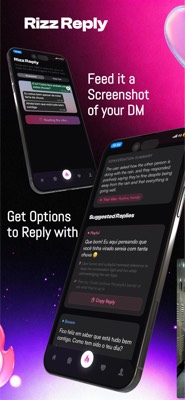
The reply you wish you'd thought of — in seconds
RizzReply solves the "I've been staring at this message for 10 minutes" problem. You screenshot the conversation — a dating-app match, an Instagram DM, a text — and RizzReply reads the full context and gives you several reply options that match the vibe and keep it moving. It's not one canned line; it's tailored suggestions you can fire back or tweak, so you never leave her on read because you didn't know what to say.
Because it reads the whole thread, not just the last message, the suggestions actually make sense. They pick up on her tone, the topics you've already touched, and the energy of the conversation — so what you get back feels like a natural continuation, not a script pasted in from nowhere. Great for keeping momentum, re-opening a dead chat, or landing the date.
Every suggestion comes with a one-tap copy button. Pick the one that sounds most like you, adjust a word or two if you want, and send. That's it. You stay in control — RizzReply just removes the blank-screen paralysis so you can actually move things forward.
Three steps from screenshot to sent
Screenshot the conversation
Take a screenshot of the chat — any dating app, Instagram DMs, WhatsApp, or plain texts. Capture enough of the thread for context.
Feed the screenshot to RizzReply
Open RizzAgent AI, go to RizzReply, and drop in the screenshot. The AI reads the full conversation and generates several reply options in seconds.
Pick a reply, copy it, and send
Choose the option that fits your style — tweak it to sound more like you if you want — then hit copy and paste it back into the chat.
No more blank-screen paralysis
Screenshot-to-reply
Drop in a screenshot from any app and get replies in seconds — no typing out the conversation manually.
Reads the whole thread
Context-aware suggestions based on the full conversation, not just the last message.
Multiple options
Pick the reply that sounds most like you, or mix and match ideas. You're always in control.
Never left on read
No more staring at the screen. Get unstuck and keep the conversation moving forward.
Part of the full RizzAgent AI toolkit
RizzReply questions
What apps does RizzReply work with?
Anything you can screenshot — dating apps like Tinder, Bumble, and Hinge, Instagram DMs, text messages, WhatsApp, and more. If you can take a screenshot of the conversation, RizzReply can read it.
Does it read the whole conversation, or just the last message?
The whole conversation. RizzReply reads the full thread context from your screenshot so the suggestions match the flow and tone of everything that's been said, not just the last line.
Will the replies sound like me?
RizzReply gives you multiple options so you can pick the one that fits your style, then tweak it before sending. You're always in control — it's suggestions, not a script.
Can it revive a dead chat?
Yes. Screenshot the conversation even if it's gone cold and RizzReply will give you a re-opener that fits the context. It's built for exactly that situation.
What does it cost?
Free to start. RizzReply is part of the RizzAgent AI coaching suite, available via an optional subscription with a 3-day free trial. Cancel anytime.
Stop staring at the screen
Start free and get the perfect reply the next time you're stuck.
Start Free →Free to start · ⭐ 4.8 on the App Store